Treating a component PCN as a yes-or-no headline can let changed parts into a build without review, or start an unnecessary requalification. Read the notice as the start of an evidence review: confirm which revision you hold, get the issuer’s full affected-parts list, match exact ordering codes to your BOM, and keep each printed date in its own field.
A product change notification (PCN) is the manufacturer’s record that a released part, or the way it is made, is changing. It tells you what the issuer proposes and plans; it does not by itself tell you whether your bill of materials is affected or whether your assembly remains acceptable. Applicability depends on the issuer’s complete affected-parts list for the current revision, matched to the exact ordering codes and assembly revisions you use. When that list or an earlier revision is missing, the correct status is unresolved.
- Record the notice number, issue date and revision before reading its content.
- Get the full affected-parts attachment; pictures and family names are not a match.
- Separate the sample request deadline, sample availability and planned implementation.
- Note how the issuer says changed material can be identified at receiving.
- Keep the issuer’s own assessment apart from your engineering decision.
The sourcing evidence route connects this review with purchase records, date-code evidence and replacement decisions.
| Input or item | Typical value or source | Why it matters |
|---|---|---|
| Notice identity | Issuer, PCN number, issue date, revision or “update” status | Decides which version you are reviewing |
| Affected-parts list | Issuer attachment or system list for that revision | The only basis for applicability |
| Your BOM rows | Full ordering codes plus assembly revision | What the list is matched against |
| Change description and assessment | Issuer’s wording, e.g. site transfer or product change | Frames what engineering must review |
| Evidence offered | Qualification plan, results or schedule; inspection or test report labels | Shows what exists and what to request |
| Dates | Request deadline, sample availability, planned implementation | Each drives a different action |
| Identification method | “No special marking”, “Date code” or another stated method | Tells receiving what can and cannot be seen |
What is a part change notification, and what does it not decide?
A PCN is an issuer’s notice of a change to a released product or its manufacturing. It records the issuer’s description and assessment. It does not decide whether your design is affected, it is not the same as a discontinuation notice, and the issuer’s “no change” assessment is not your engineering approval.
Texas Instruments’ policy page describes notification of major changes that affect form, fit or function, or adversely affect quality or reliability, after a product is released to market. TI states that it complies with J-STD-046 for timely notification; this guide has not reviewed that standard’s text and does not state what it requires.
The same TI page runs product withdrawal and discontinuance through a separate process with different notice contents, such as last order and last delivery dates. So the first classification is simple: is this a change to a part that continues, or a withdrawal? If it is a withdrawal, the work belongs on the obsolete-component replacement matrix rather than in this review.
An issuer’s assessment is useful evidence of its own position. Molex PCN 501827 (2017) states “No change to parts/components FFF”, meaning form, fit and function. That sentence tells you what Molex concluded about its part; whether your assembly still meets its requirements remains a decision for the engineering owner of that assembly.
Takeaway: Classify the notice as a change or a withdrawal, and file the issuer’s assessment as its claim, not your conclusion.
Which notice and revision are you actually reviewing?
Before reading the change description, record the issuer, notice number, issue date and whether the document updates an earlier notice. An update can change the affected parts, dates or description, so a review based on the wrong revision answers the wrong question.
Molex PCN 514891, issued April 24, 2024, gives “Update Previously Issued Change Notice” as its reason for short notice. Its embedded overview slide says it updates previously issued PCN 514277, communicated January 23, 2024. The earlier notice is not part of the archived file used here, so this guide cannot say what changed between the two; a real review would retrieve both and compare them.
TI’s FAQ says its PCN dashboard shows all revisions of a PCN when you select the PCN number. Other issuers use other systems, so record where each revision came from.
| Revision register field | What to enter |
|---|---|
| Issuer and notice number | As printed, e.g. “Molex, PCN 514891” |
| Issue or generation date | As printed on the document |
| Revision or update status | Revision letter, “update” wording or earlier notice referenced |
| Earlier notices referenced | Number and date; retrieved yes/no |
| Attachments referenced | Name as printed; obtained yes/no |
| Where obtained | Issuer system, email or distributor-hosted copy, with date retrieved |
The same habit applies to datasheets: the datasheet condition checklist records document identity and revision before copying values.
Common mistake: Reviewing a forwarded copy without checking whether a later revision exists, or treating an “update” as a complete record of the earlier notice.
Takeaway: Fix the exact revision, and list referenced notices and attachments as obtained or missing, before anyone reads the change.
What do two historical Molex notices show when read field by field?
Read side by side, two archived Molex notices show the same pattern: each names the change and its dates, and each points to a parts list that is not in the archived PDF. They are historical document-reading examples from 2017 and 2024, not current notices, and say nothing about present Molex status.
Both PDFs were retrieved as copies hosted on Farnell’s datasheet server. Values below are as printed; “not shown” means the field does not appear in that document.
| Field | PCN 501827 (2017) | PCN 514891 (2024) | What to do with it |
|---|---|---|---|
| Date issued | March 9, 2017 | April 24, 2024 | Enter in the revision register |
| Reason for change | Equipment transfer, production transfer or rearrangement | Change to product | Route a site/process change and a product change to the right reviewer |
| Description | Production of the identified parts moving to a different location; no product change | Changes to parts “as identified in the list”; will affect appearance | Record wording verbatim |
| Reason for short notice | Special request | Update previously issued change notice | For an update, retrieve the earlier notice |
| Issuer assessment | No change to parts/components FFF | First Article Inspection; Reliability Test Report/s | Labels, not results; request the reports if your review needs them |
| Qualification date | January 10, 2017 (internal Molex) | Not shown | Record what is printed |
| Last date to request samples | Not shown | April 30, 2024 | Act before it if you need samples |
| Sample availability | January 10, 2017 (changed part) | May 3, 2024 | Different from the request deadline |
| Planned implementation | March 20, 2017 | May 31, 2024 | A plan, not proof of when your stock changed |
| Identification method | No special marking on product or packaging | Traceability: date code | Tells receiving what is and is not visible |
| Affected-parts list | Slide refers to an “attached list of parts”; not in archived PDF | Slide says “See attached impacted parts list”; not in archived PDF | Unresolved until obtained |
Two details are worth recording in a real review. In PCN 501827 the form says production is moving, while its slide describes a change of shipping location; keep both wordings and ask the issuer which applies to your parts. In PCN 514891 the before-and-after picture carries the note that it is “used as representation of product only and may not be exact to product you receive”, so the picture cannot be used to decide whether your part is the one changing.
For the wider manufacturer-documentation context, start from the component documentation route.
Takeaway: Copy each field as printed, mark missing attachments as missing, and do not let a picture or summary stand in for the list.
How do you know if your parts are affected?
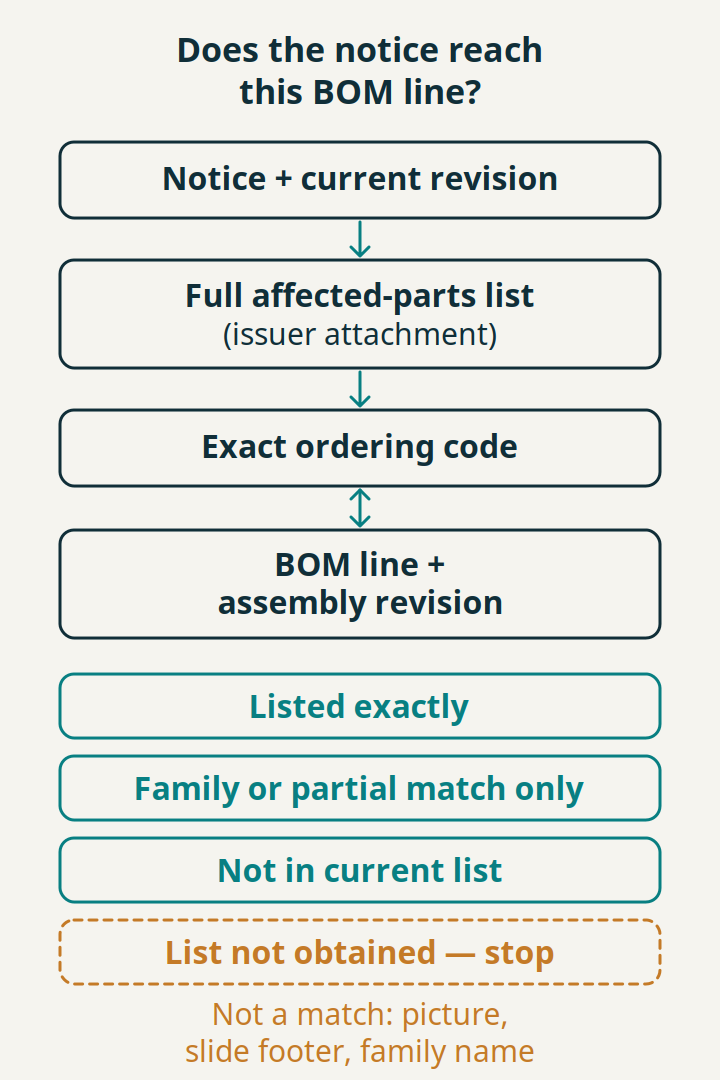
Your parts are affected only if the issuer’s affected-parts list for the current revision contains the exact ordering codes on your BOM. Match code by code against the BOM line and assembly revision. If you do not have the full list, the status is “list not obtained” and the review stops there.
TI lists “product identification (affected products)” among the information it provides before a notifiable change. The two Molex examples show why the attachment matters: each refers to a list that is not in the archived file, and the only part-style identifier visible in the 2024 file, “2156740051 Revision A”, is printed beside the product picture and on the slide. A footer, a product photo or a connector family name is not a list of affected orderable parts. TI’s own FAQ index includes the question “I received an email with affected parts. How can I find the corresponding information for a PCN?”; whatever the delivery channel, tie each listed part back to its notice and revision.
| Match log field | What to enter |
|---|---|
| Notice and revision | From the revision register |
| List source | Attachment name or issuer system, with date obtained |
| Listed ordering code | Exactly as printed in the list |
| BOM ordering code | Exactly as in your approved BOM |
| BOM line and assembly revision | Where the part is used, by revision |
| Match status | Listed exactly · Family or partial match only · Not in current list · List not obtained — stop |
| Clarification sent | What was asked of the issuer, and when |
| Reviewer | Person who made the match |
“Family or partial match only” covers cases such as the same base number with a different suffix, packaging or plating code. Send it to the issuer for clarification rather than resolving it by assumption. Before matching, make sure the BOM holds full ordering codes rather than package markings; the ordering-code, marking and board-reference record explains the difference. For parts already fitted in installed equipment, the control-board maintenance record shows how to take board identity from existing authorized records, and to leave it unknown when it cannot be obtained that way.
Takeaway: Match exact ordering codes from the issuer’s current list to BOM lines and assembly revisions; with no list, record “list not obtained” and stop.
Which PCN dates matter, and why keep them apart?
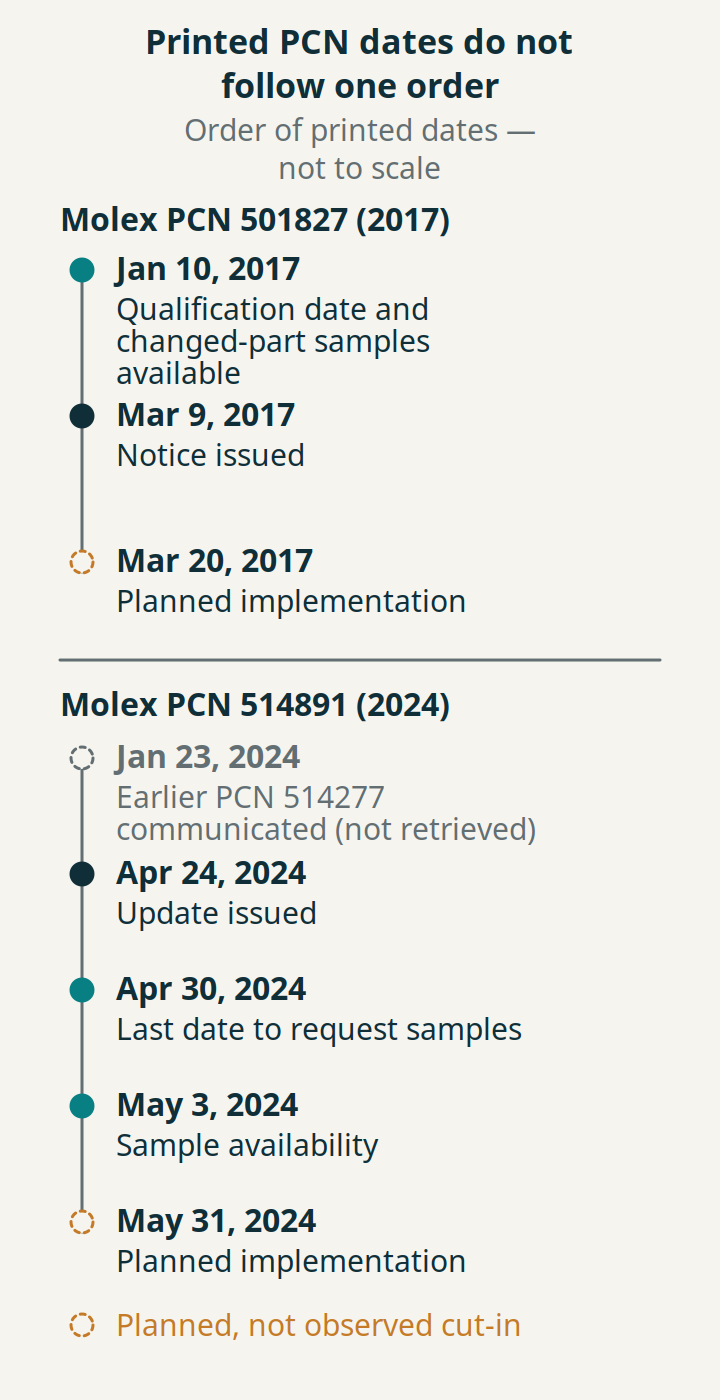
A notice can carry an issue date, a qualification date, a sample request deadline, a sample availability date and a planned implementation date. Each triggers a different action, and the two examples show they do not follow one fixed order, so record each in its own field rather than as a single timeline.
In PCN 501827, the qualification date and changed-part sample availability (January 10, 2017) both come before the issue date (March 9, 2017), and planned implementation (March 20, 2017) follows 11 days after issue. In PCN 514891, the last date to request samples (April 30, 2024) falls six days after issue and before samples were available (May 3, 2024); planned implementation is May 31, 2024. Its note adds that samples not requested by that date “may take additional 4-6 weeks to arrange”.
| Date field | Action it drives | Watch for |
|---|---|---|
| Issue date / revision date | Start of your review; revision register | Updates re-issue dates |
| Sample request deadline | Order samples if engineering needs them | Can precede availability |
| Sample availability | Plan evaluation work | Not a request deadline |
| Qualification date or schedule | Ask for results if needed | A date is not a result |
| Planned implementation / projected shipment | Plan receiving checks | A plan, not observed cut-in |
Sample windows are issuer policies. TI’s FAQ allows sample requests within 60 days of PCN notification; after that window it accepts a Late Sample Request but says changed-material samples may not always be available and it may approve or deny the request. That 60-day window belongs to TI. Do not apply it, or any other fixed number of days, to another manufacturer’s notice; use the dates printed on the notice you hold.
Takeaway: Keep each date in its own field, act on the request deadline first, and treat implementation as a plan.
How will receiving tell changed material from earlier stock?
Use the identification method the notice states, and record what it does not tell you. “No special marking” means changed and unchanged parts may look the same; “Date code” names a traceability field but not which code is the first changed lot. A planned implementation date does not show when your supplier’s stock changed.
PCN 501827 states “No special marking on the product or packaging”, so receiving cannot separate before-change and after-change material by inspection alone; the evidence has to come from documents linked to the lot. PCN 514891 lists “Date code” under traceability code markings, but the archived notice gives no specific date code at which the change starts. If the review needs that boundary, request it from the issuer and record the answer with its source.
Record the observed date code and lot, the purchase document and the notice revision together. The date-code and traceability record covers how to read a date marking with the manufacturer’s rule. A manufacturing-site or supply-site change follows the same evidence logic as the chemistry site-change checklist: establish whether your exact product and supplying site are covered before assuming anything has changed.
Common mistake: Assuming every part received after the planned implementation date is changed material, or that everything received before it is not.
Takeaway: Record the stated identification method, the observed lot evidence and any unanswered cut-in question side by side.
Who reviews what after the notice arrives?
Split the work so that each decision has an owner and a document. A practical split is procurement for the notice, revisions and requests; engineering for the assembly impact; receiving for lot identification; and quality for the evidence file. This is an editorial suggestion, not a standard or a company policy.
| Role | Owns | Output |
|---|---|---|
| Procurement / component engineering | Notice, revisions, affected-parts list, issuer requests | Revision register, match log, request record |
| Design or product engineering | Impact on the actual assembly and its requirements | Review decision with reasons, or a request for samples or data |
| Receiving | Lot and date-code evidence against the stated identification method | Receiving record linked to notice revision |
| Quality | Evidence received and its scope | File of reports, plans and correspondence |
When a notice lacks information your review needs, request the specific item. TI’s field list is a useful prompt for what to look for: description, reason, tracking number, affected products, contact, anticipated impact on form, fit, function, quality and reliability, qualification plan and results (or schedule), sample availability and projected production shipment date. TI’s FAQ describes a Request Info option for a PCN or a specific part; other issuers name their own channel on the notice. A label such as “Reliability Test Report/s” tells you a report type exists in the issuer’s assessment, not what it found. Record the request and the answer in the same file, and continue the purchase record through the sourcing evidence route.
Takeaway: Give each decision a named owner, and request missing evidence by name rather than inferring it.
When this does not apply
This review covers reading a change notice and organising the evidence. It does not plan last-time buys after a discontinuation, select a replacement part, approve an assembly, or establish compliance with J-STD-046 or any other standard.
- If the notice is a withdrawal or discontinuance, use the obsolete-component replacement matrix.
- If the change pushes you toward a different part, treat it as a replacement assessment; the HARTING Han Size 4 review shows that comparison for a connector.
- If the affected-parts list or earlier revision cannot be obtained, record the notice as unresolved; this guide offers no substitute for the list.
- The two Molex notices are historical examples; they do not describe current Molex parts, lists or dates.
Takeaway: Use this record to make the review accountable, not to replace the issuer’s list or your engineering decision.
Methods and sources
This guide compiles public manufacturer documents; it reports no tests, inspections or sample evaluations. TI’s PCN policy page and five TI ordering-FAQ pages were read on October 11, 2026, and their sample windows and dashboard functions are described as TI’s own practices. Molex PCN 501827 (March 9, 2017) and PCN 514891 (April 24, 2024) were read as PDF copies hosted on Farnell’s datasheet server, retrieved October 11, 2026, including the slide text embedded on each page. Neither archived PDF contains the affected-parts attachment it refers to, and the earlier notice PCN 514277 was not retrieved. The review record, match statuses and role split are editorial recommendations. Our independence and sourcing approach are set out in the editorial policy.
Related reading
- Obsolete component replacement matrix — Use it when the notice is a discontinuation rather than a change.
- Component date codes and traceability — Record date markings and lot evidence at receiving.
- Ordering codes, markings and board references — Get full ordering codes into the BOM before matching.
Next step: Read the relevant manufacturer notice in full, enter its revision in the register, and gather the missing affected-parts list or earlier revision from the issuer before you match it against your BOM.